

Reusable creative direction
Hyper Motion AI Product Video Ad Examples
Compare three Hyper Motion executions, then adapt their reusable visual directions to your product. Product and Avatar references document the original case but are not loaded into your studio.
Example 1 / Video ad
Hyper Motion
Fast movement and high-impact product energy
Product
Not paired in this result
Avatar
Not paired in this result
Reusable visual direction
Use the uploaded product as the exact reference, preserving its shape, proportions, colors, materials, surface details, labels, and packaging in every frame. Keep people off screen and make the uploaded product alone the exact, physically coherent subject of every motion beat. Open with an extreme macro glide across one reference detail; then the product launches through a flowing tunnel of abstract particles and rotates once; finally it decelerates into a clean frontal position. Use a fast virtual camera using smooth speed ramps, a barrel move, and a controlled macro finish. Use glossy colored rim lighting in an abstract liquid-motion scene with deep negative space. End on the product hovering motionless in a high-contrast hero payoff. Do not redesign the product, invent logos or text, add extra products, distort faces or hands, change reference identity, break physical continuity, introduce flicker or warping, or add captions and watermarks.
Best for
Studying the creative structure before adding your own product.
What to customize
Use your product and approved wording, then adjust the shot, action, and pacing for the duration you selected.
Example 2 / Video ad
Hyper Motion 2
Fast movement and high-impact product energy
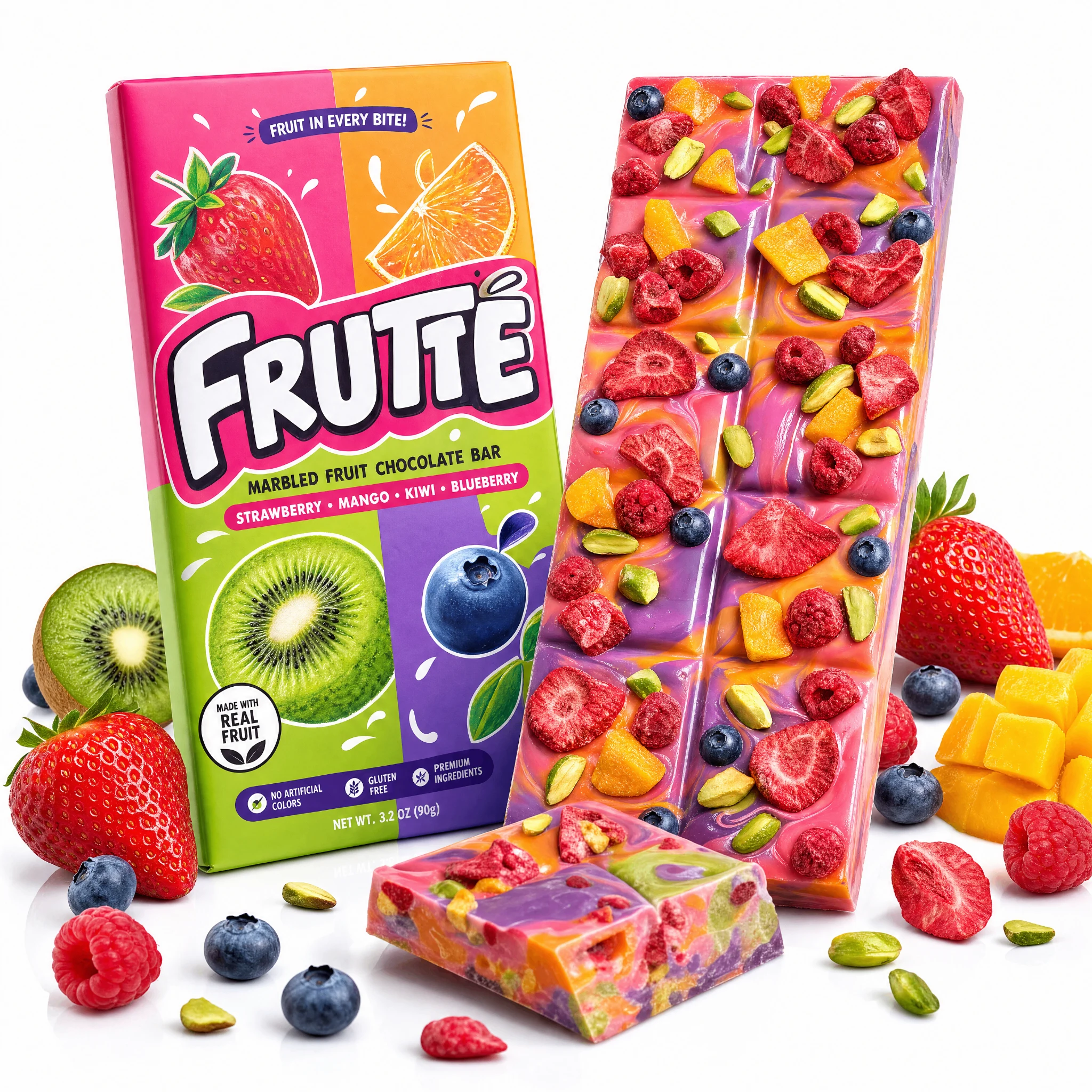
Product
Frutte Marbled Fruit Chocolate Bar
Avatar
Not paired in this result
Reusable visual direction
Use the uploaded product as the exact reference, preserving its shape, proportions, colors, materials, surface details, labels, and packaging in every frame. The uploaded product moves alone through the sequence, preserving exact labels, geometry, and material response during every transition. Open with a centered pedestal shot that suddenly accelerates forward; then the item passes through streaked architectural frames and multiplies only as temporary motion echoes; finally all echoes collapse back into one product. Use a stabilized chase camera with rapid parallax, one overhead roll, and a slow final push. Use bright urban-neon lighting with controlled reflections in a stylized night-city corridor scene without readable signage. End on the single product locked at center over a reflective hero surface. Do not redesign the product, invent logos or text, add extra products, distort faces or hands, change reference identity, break physical continuity, introduce flicker or warping, or add captions and watermarks.
Best for
Understanding the structure with its bound Product reference.
What to customize
Use your product and approved wording, then adjust the shot, action, and pacing for the duration you selected.
Example 3 / Video ad
Hyper Motion 3
Fast movement and high-impact product energy
Product
Not paired in this result
Avatar
Not paired in this result
Reusable visual direction
Use the uploaded product as the exact reference, preserving its shape, proportions, colors, materials, surface details, labels, and packaging in every frame. Keep people absent while the uploaded product and a few abstract material forms move with believable weight and scale. Open with the product emerging from darkness between geometric panels; then panels sweep around it as the item turns through three readable angles; finally the motion freezes and the panels align behind it. Use a precise virtual orbit camera with match cuts, macro texture passes, and a symmetrical pullback. Use premium softbox lighting with sharp edge accents in a minimal kinetic-studio scene with monochrome architecture. End on a perfectly still product-alone hero payoff framed by the aligned geometry. Do not redesign the product, invent logos or text, add extra products, distort faces or hands, change reference identity, break physical continuity, introduce flicker or warping, or add captions and watermarks.
Best for
Studying the creative structure before adding your own product.
What to customize
Use your product and approved wording, then adjust the shot, action, and pacing for the duration you selected.
Photo2Ads workflow
From this case to your product
Choose one direction
Each preview demonstrates a distinct scene, camera, action, or pace.
Review the evidence
Source references explain the example without replacing your materials.
Generate and refine
Adapt the visual direction and Dialogue while keeping your current model and duration.
All examples
More directions to explore
Explore other canonical creative-style collections in the same category.
Photo2Ads / create